Selecting an Enterprise Resource Planning (ERP) system is one of the most critical decisions a business leadership team will ever make. An ERP system serves as the digital backbone of an organization, integrating essential functions such as finance, human resources, supply chain management, manufacturing, procurement, and customer relationship management into a single unified platform.
When implemented correctly, an ERP platform breaks down operational silos, automates repetitive business processes, improves data accuracy, and provides real-time analytics for faster, smarter decision-making. However, choosing the wrong ERP system can lead to massive cost overruns, operational disruptions, low employee adoption, and years of technical friction.
With hundreds of ERP vendors offering various deployment models, industry-specific modules, and pricing structures, navigating the selection process requires a structured strategy. This guide breaks down the essential steps to choose the right ERP system tailored specifically to your organization’s unique requirements and long-term growth objectives.
1. Understand Your Core Business Objectives and Pain Points
Before evaluating any software vendors or scheduling product demonstrations, you must look inward. A common pitfall for many companies is jumping directly into software features before clearly defining what problem they are trying to solve.
Start by conducting a comprehensive internal audit across all departments. Gather key stakeholders from finance, operations, sales, logistics, and IT to document current operational bottlenecks and inefficiency drivers.
Ask targeted operational questions to define your exact business needs:
- Where are the data silos? Are departments relying on disconnected spreadsheets and manual data re-entry to complete daily tasks?
- What are the reporting delays? How long does it take leadership to generate accurate month-end financial statements or real-time inventory reports?
- Where are customer experience breakdowns occurring? Are order delays or fulfillment errors happening due to poor communication between sales and inventory teams?
- What are the scalability roadblocks? Is your current legacy software preventing entry into new markets, handling higher transaction volumes, or supporting international multi-currency compliance?
Documenting these pain points helps establish concrete business objectives. Instead of seeking generic goals like “improving efficiency,” define measurable outcomes, such as reducing inventory holding costs by 15%, cutting order processing time in half, or automating vendor invoice matching.
2. Define Essential ERP Features and Functional Requirements
Once your business objectives are clearly mapped out, translate them into a definitive list of required functional capabilities. Modern ERP systems come packed with extensive feature sets, but paying for advanced tools your company will never use increases software complexity and total cost of ownership.
Categorize your functional requirements into three distinct tiers:
- Must-Have Features: Non-negotiable capabilities essential for daily operations (e.g., multi-currency general ledger, real-time inventory tracking, batch traceability, automated payroll).
- Nice-to-Have Features: Useful tools that add operational value but are not immediately critical (e.g., advanced predictive analytics, integrated customer portals, mobile warehouse scanning).
- Future Requirements: Functionality you will likely need as your enterprise scales over the next three to five years (e.g., international tax compliance modules, AI-driven demand forecasting).
Focus heavily on industry-specific requirements. A discrete manufacturing firm requires deep bill-of-materials (BOM) routing, shop-floor scheduling, and quality control management. Conversely, a professional services agency requires robust project accounting, resource utilization tracking, and time-and-billing management. Avoid generic platforms that require expensive custom coding when specialized industry solutions already exist off the shelf.
3. Compare Deployment Models: Cloud vs. On-Premise vs. Hybrid
Choosing the right technology architecture is a foundational decision that impacts your initial capital expenditure, ongoing IT maintenance requirements, data security, and system flexibility.
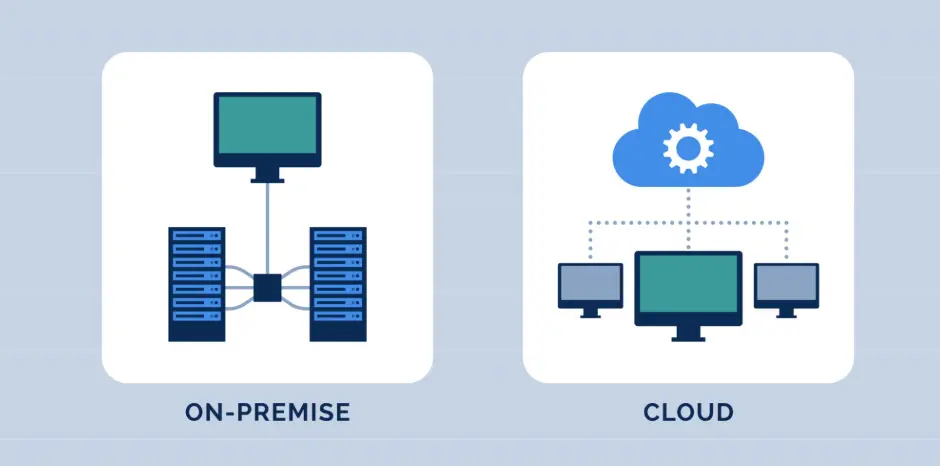
Cloud ERP (SaaS)
Cloud-based ERP platforms are hosted on the vendor’s or third-party cloud infrastructure (such as AWS, Azure, or Google Cloud) and accessed via a web browser or mobile application.
- Advantages: Lower upfront capital investment, rapid deployment times, automatic software updates, seamless scalability, and remote access from anywhere.
- Considerations: Ongoing monthly or annual subscription fees, less control over update schedules, and potential internet connectivity dependencies.
On-Premise ERP
On-premise ERP solutions are installed locally on your company’s physical servers and managed directly by your internal IT staff.
- Advantages: Complete control over data governance, system security, and custom configurations, along with independence from external internet reliability.
- Considerations: High upfront hardware and licensing costs, ongoing server maintenance expenses, complex upgrade paths, and the requirement for an in-house IT maintenance team.
Hybrid ERP
A hybrid deployment combines on-premise infrastructure with cloud environments, often used by enterprise organizations that want to keep sensitive core financial databases on-premise while leveraging cloud applications for field sales or distributed supply chain logistics.
4. Calculate the Total Cost of Ownership (TCO)
Evaluating ERP pricing based solely on initial software license costs or monthly SaaS subscriptions is a major strategic mistake. The true financial commitment of an ERP software deployment is represented by its Total Cost of Ownership (TCO) calculated over a five-to-seven-year period.
To build an accurate financial model, account for all direct and indirect cost drivers:
- Software Licensing / Subscriptions: Per-user monthly fees, module access fees, and tier-based usage charges.
- Implementation and Consulting Fees: Costs associated with external system integrators, solution architects, project managers, and technical consultants. Implementation costs frequently equal or exceed the initial software license cost.
- Data Migration: Cleaning, formatting, mapping, and transferring historical data from legacy systems into the new ERP database.
- System Customization and Integration: Building custom API connectors to bridge the ERP with third-party systems like specialized e-commerce platforms, CRM databases, or warehouse machinery.
- Employee Training and Change Management: Developing training materials, conducting workshops, and accounting for temporary productivity dips during the rollout phase.
- Ongoing Support and Maintenance: Annual software maintenance fees, hardware server upgrades (for on-premise solutions), internal IT salaries, and vendor support plans.
Comparing vendor proposals using a complete TCO framework prevents unexpected financial surprises midway through implementation.
5. Prioritize User Experience (UX) and Mobile Accessibility
An ERP platform can boast the most advanced feature set on the market, but if your employees find the user interface clunky, unintuitive, or confusing, adoption rates will plunge. User resistance is one of the leading causes of enterprise software project failures.
During product demonstrations, pay close attention to the overall user experience:
- Intuitive Dashboard Navigation: Can users easily customize their role-based dashboards to view key performance indicators (KPIs) relevant to their daily tasks?
- Search and Data Retrieval: Is there a global search feature that allows staff to locate sales orders, vendor profiles, or part numbers quickly?
- Mobile Functionality: Does the ERP offer dedicated native mobile apps or responsive web interfaces so warehouse workers, field technicians, and travelling executives can capture data on the go?
- Data Input Efficiency: How many clicks or screen transitions are required to complete standard daily workflows, such as entering a purchase requisition or updating customer record details?
Involve end-users from various operational levels in vendor demo sessions. Their feedback regarding ease of use provides valuable insight into how smoothly the new platform will integrate into daily operational routines.
6. Evaluate Vendor Reputation, Ecosystem, and Support
When choosing an ERP system, you are not simply buying software; you are establishing a long-term strategic partnership with a technology vendor and their implementation network.
Thoroughly vet potential software partners using the following criteria:
- Industry Experience and Case Studies: Request reference accounts and case studies from organizations operating in your exact market sector and of similar size. Ask vendors directly about their experience addressing industry-specific regulatory standards and operational compliance mandates.
- Partner Ecosystem: Many top-tier ERP software publishers rely on authorized third-party value-added resellers (VARs) or certified implementation partners to deploy their software. Evaluate both the software vendor and the specific partner team assigned to execute your project.
- Product Roadmap and R&D Investment: Investigate the vendor’s track record for innovation. Are they actively investing in modern technologies like artificial intelligence, machine learning, automated workflows, and advanced cybersecurity protections?
- Support SLA and Community: Review vendor support Service Level Agreements (SLAs). Ensure they offer responsive local support, comprehensive documentation, user knowledge bases, and active peer community forums.
7. Structure a Rigorous Selection and Vendor Evaluation Process
To remain objective throughout the selection project, follow a structured decision-making roadmap.
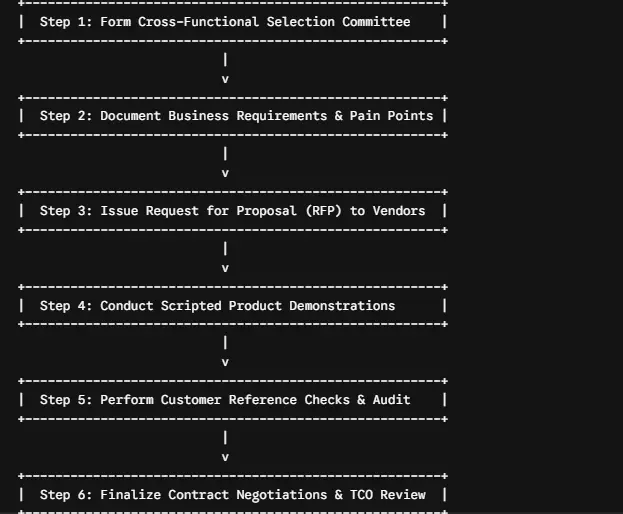
Form a Steering Committee
Assemble a dedicated cross-functional team consisting of executive sponsors, IT leaders, department heads, and key operational end-users. This team oversees requirement scoping, vendor scoring, and final candidate recommendation.
Issue a Request for Proposal (RFP)
Draft a formal RFP detailing your company background, project scope, functional requirements checklist, IT infrastructure constraints, vendor support expectations, and pricing structure requests. Send the RFP to a shortlist of four to six qualified ERP vendors.
Schedule Scripted Vendor Demos
Avoid standardized vendor pitch decks. Provide shortlist vendors with customized, real-world scenario scripts based on your actual business workflows. Require vendors to demonstrate how their system handles your specific daily order-to-cash, procure-to-pay, or inventory management workflows step by step.
Check References Thoroughly
Speak directly to reference clients provided by the vendor—preferably companies in your industry. Inquire about the vendor’s implementation adherence to timelines and budgets, software bug responsiveness, data migration challenges, and post-go-live support quality.
Final Thoughts: Making the Right ERP Decision
Choosing the right ERP platform is a transformational project that can elevate your operational capabilities, drive cost efficiencies, and position your company for sustainable growth. Success requires balancing immediate functional demands with long-term strategic agility.
By thoroughly auditing internal processes, clearly prioritizing functional needs, calculating total cost of ownership, and evaluating both the platform UX and vendor ecosystem, leadership teams can confidently select an ERP system that delivers measurable business value for years to come.